RHUB

Remote Control, Screen Sharing Software Delivered by RHUB Appliances

  Contact About FAQ Blog
Call 866-758-0984
Home   Products   Customers   Purchase   Partners   Support   Press   Register Webinars


Benefits of RHUB Web Conferencing and Remote Support Appliance

 
 remote support appliance You Own It, You Control It!

With the RHUB on-premise appliance, you own and control it.
  No monthly fees. No IT maintenance. 3 to 10 month payback
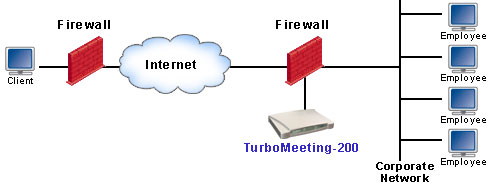
  On-premise security by the ultimate protection, your firewall
  Brand your organization name. Integrate with your applications 

Read more ...

 
remote access appliance Guaranteed Attendance! No Download of Any Kind!

How many of your Web meetings have been ruined by key attendees not able to download and install software to join? With RHUB’s TurboMeeting patent pending universal attendance technology, everybody can join your meeting, guaranteed! No download of any kind! 

Read more ...  

   
Web Conferencing
Web Seminars
Remote Support for PC & Mac
Remote Access to My PC
4-in-1, Outstanding Value! 

Have you paid separate subscriptions services for: Web conferencing, Web seminar, Remote support and Remote access? With a RHUB 4-in-1 appliance, you get all four in one unit starting at less than $1,000.

Read more ... 


Free Audio Conferencing
 
 
Audio Conferencing Integration
 
 
Free Audio Conferencing & Integration

All products are integrated with the RHUB free audio conference service with land-line quality. Or you may configure the appliance to integrate with your own audio conference bridge or service.

Read more ...  


You Own It --- 3 to 10 Month Payback Compared to Monthly Subscription!

An on-premise RHUB appliance saves you money:

  • No more monthly fees. 3 - 10 month payback compared to the subscription fees of your service providers
  • Unlimited web collaboration: web conferencing, webinar, remote support, and remote access.

The TM-200, TM-250E, TM-550, and TS-300 are perfect for any sized office. They are compact and quiet with a fanless operation. These appliances work on less than 4.5 watts (TM-200 & TS-300) & 14 (TM-250E & TM550) watts of power to help keep your office green.

Click here for a detailed feature and cost comparison between the RHUB appliance and leading hosting solutions.


You Control It --- On-Premise Security, Maximum Customization, Better Performance

Discover the advantages of RHUB appliance on-premise deployment:

  • On-premise meeting security by the ultimate security protection - your firewall. Whether a meeting is held just for your employees or for anyone on the web, your firewall adds a measure of security that host service providers cannot offer.  Read more.

firewall security

  • Maximum customization:
 
 
  1. Start or join meetings from your internal home page or other enterprise applications
  2. Direct your attendees to your own promotion page when meetings or support sessions end
  3. Brand your company name, logo, applications, etc. Read more.
  4. Publish your scheduled meetings on your websites or applications
  5. Integrate with your websites and applications

  • Better performance - All LAN users work at LAN speeds. This product is especially useful during collaboration using those applications with moving images such as 3D CAD design, flash graphic design, etc.
  • No IT maintenance. The RHUB appliance is self-updated.
 

No Download of Any Kind --- Guaranteed Attendance!

If you have used other web conferencing service, you have likely experienced some of your attendees failing to join in your conference because of problems such as:

  • Lockdown computers protected by corporate IT policies preventing the installation of your software
  • Firewall and proxy server blockages
  • Anti-virus and anti-spy software blockages
  • Unsupported platforms like Mac, Linux, Unix, etc.
  • Wrong or missing Java Virtual Machine or Flash installation

Then the whole conference falls apart.

Quick, easy and 100% attendance has been demanded since day one when web conferencing started. Today, RHUB presents the first truly "Universal Attendance" web conferencing solution.

  • Your meeting attendees do not need to download any kind of software, no Java Applet, no Flash, no documents.
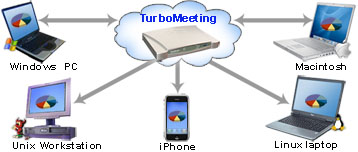
  • As long your attendees can view Google and Yahoo maps with their browsers from any of the platforms - Windows, Windows Mobile, Mac, Linux, Unix, iPhone and iPad, we guarantee that they can join your meetings and see your presentations. If your attendees cannot join your meetings with our products, just return our product for a full refund. See our Return Policy.
  • Joining a meeting is as easy as entering a URL and takes as little as 5 seconds, depending on your attendees' Internet connection speed.
 

universal web conferencing

no-download web conferencing


To see how it works, simply follow the steps below for a free trial:

  1. Click the "TRY IT FREE" button on the top of this page
  2. Click the "Register here" link
  3. Download and install TurboMeeting. The no-download function applies only to your attendees.
  4. Run TurboMeeting and start to Host an unscheduled meeting.
  5. Select the "Seminar" meeting type.
  6. Now, send your attendees the meeting URL to allow them to join your meetings.

In addition to the seminar meeting type, TurboMeeting supports much more sophisticated and powerful meeting types -  interactive, remote support and remote access, which require meeting attendees to download and install TurboMeeting. 


Free Audio Conferencing & Integration

All RHUB appliances include audio conference call service at no extra cost to you. You may decide to use the RHUB service or choose your own audio conferencing method.

The RHUB audio conferencing service provides a toll-based US number that can be dialed by all meeting participants. Participants are then charged their standard long-distance rate for calling this toll-based number, just as if they made a regular long-distance call.

RHUB has not provided toll-free audio conferencing service yet. You can select any of audio conferencing services including your own audio conferencing bridge. Integrating with audio conferencing is as easy as inputting a call number to the TurboMeeting system. The call number will be passed to your meeting invitation messages and the TurboMeeting meeting control panel automatically.

Note that the RHUB land-line free audio conferencing is a courtesy service to the RHUB customers. Like the free audio conferencing services offered by hosted web conferencing service providers, the availability of the RHUB free audio conferencing service is subject to the US FCC regulations. RHUB has been providing the service since 2008.